01 / collectorRead pressure and headroom locally
The Rust core gathers memory, swap, disk, and process state on the Mac it is protecting.
Rust · sysinfo · macOSCrash Guard for developer Macs.
Mid-screen-share, macOS runs out of application memory and the call freezes. Rewind nine minutes: inside the 18 GB, one app never stops growing. Crash Guard forecasts the freeze, warns first, and Stop safely re-checks the process before it acts. 14:39:07, same second, still on the call. Score: “Tues” by Hope Atina.
Perf Pulse came from a failure I kept hitting. Agents, builds, and desktop apps would eat memory or disk until the Mac stopped responding, while Activity Monitor sat there unopened. Crash Guard turns that late diagnosis into an always-on warning, a local dashboard, and a deliberate next move.
brew install hopeatina/perf-pulse/perf-pulsepublic tap · Apple Silicon + Intel · protection remains opt-inThe consequential problem
The failure rarely begins with one obvious process. Agent sessions accumulate, a build spikes, swap grows, or generated artifacts quietly consume the remaining writable disk. By the time the Mac becomes visibly slow, opening another inspection tool is already late.
A useful guard had to run continuously, explain which resource was approaching danger, and lead straight to a safe response. No root access, and no new heavyweight service.
What I saw
Crash Guard connects three moments that system utilities usually separate: the trend before failure, a concise native alert, and the exact live dashboard for that incident. Developers can tune the guard to their machine, inspect bounded storage hotspots, and decide whether to stop a process with its identity revalidated at action time.
The decision that changed the system
A headless launchd agent samples memory pressure and writable-disk headroom even when the dashboard is closed. When a threshold is crossed, a native alert can reopen the dedicated Crash Guard tab on the live localhost server. The person at the keyboard decides what to stop, which thresholds to change, and when to turn protection off. The monitor doesn't.
A per-user agent samples memory pressure and writable disk locally.
Thresholds and disk forecasting surface risk before the machine becomes unresponsive.
The alert leads to the dedicated live Crash Guard dashboard with the relevant context.
The user tunes protection, inspects storage, or requests an identity-checked process stop.
System anatomy / rationale / surfaces
The guard can keep watch without an open browser, while the dashboard appears only when the developer needs context or control. CLI, TUI, and overview surfaces read from the same underlying system state.
Manual inspection begins only after the developer notices slowdown, low disk, or a frozen machine.
Run Crash Guard as an opt-in per-user launchd agent with tunable memory and disk thresholds.
Protection persists across dashboard sessions without a root daemon or macOS system extension.
The Rust core gathers memory, swap, disk, and process state on the Mac it is protecting.
Rust · sysinfo · macOSTunable thresholds, trend checks, and disk forecasting distinguish current load from a deteriorating trajectory.
Tokio · local rulesNative notifications can open the dedicated Crash Guard tab on the exact localhost dashboard serving that Mac.
launchd · Axum · native alertsConfiguration is explicit, storage diagnostics stay read-only, and stop requests revalidate process identity before signaling.
PID + name + start timeThe product can warn while the developer still has room to respond.
Risk, controls, and current process context arrive together.
Convenient action does not erase the safety boundary.
The system becomes tangible through the places people encounter and use it.
Persistent memory and disk protection with tunable thresholds and native alerts.
The exact live operating picture for protection status, recent incidents, and intervention.
Fast checks and sustained inspection stay where developers already work.
Installation becomes the first coherent product interaction, not a README obstacle.
Rust · Tokio · sysinfo
launchd · Axum · local API
Homebrew · native alerts · optional webhooks
Select a tool to see the role it plays in this system.
A memory-safe, compact core keeps continuous collection predictable on the machine it is protecting.
Authentic proof
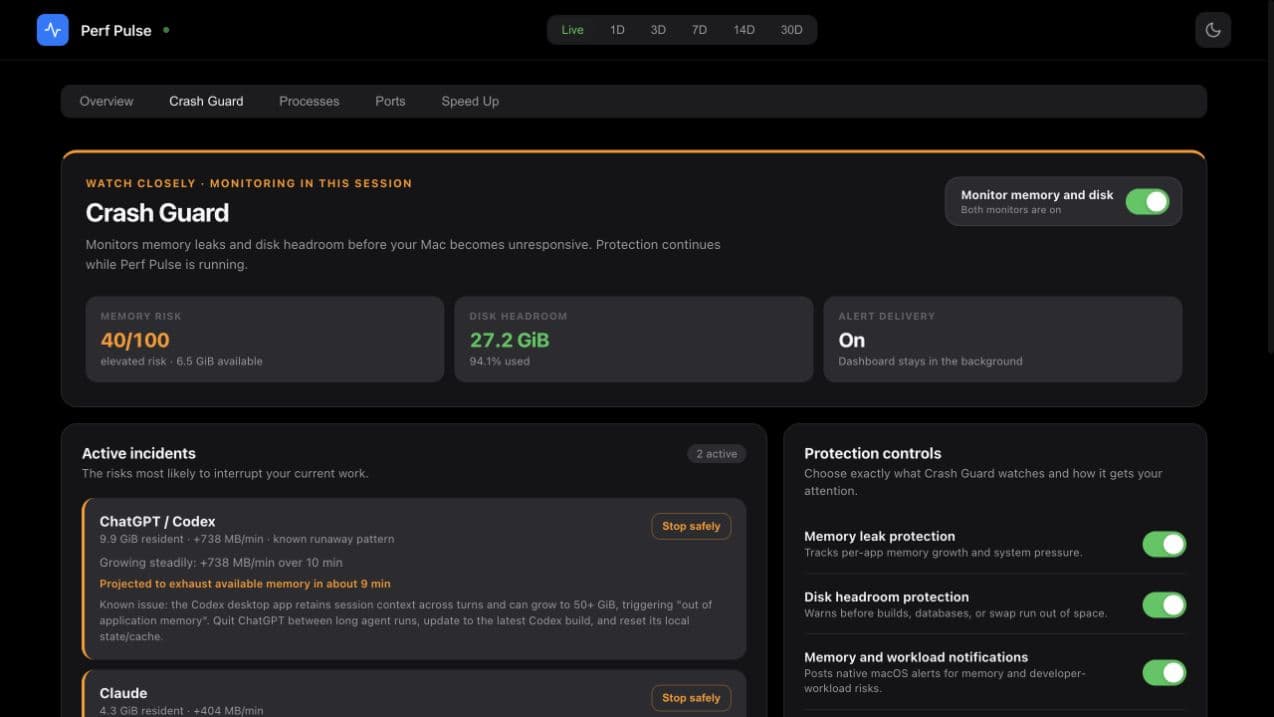
The notification opens the exact live dashboard developers need: current risk, tunable thresholds, recent incidents, and identity-checked stop controls in one place.
Protection state, threshold controls, incident history, and the next safe action stay in one focused local surface.
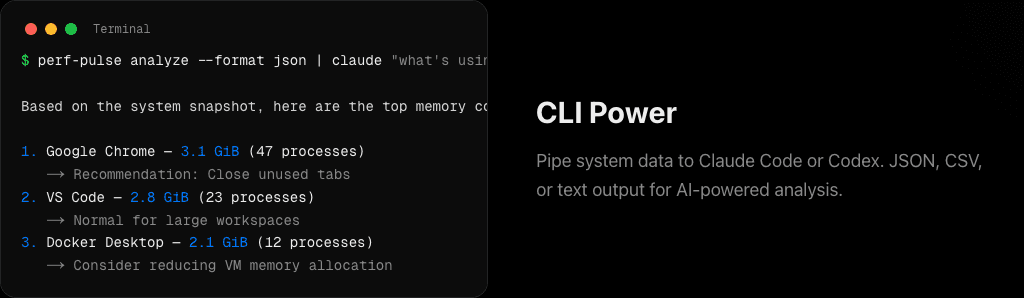
The shortest path from machine state to an actionable explanation stays in the terminal and can feed another tool when needed.
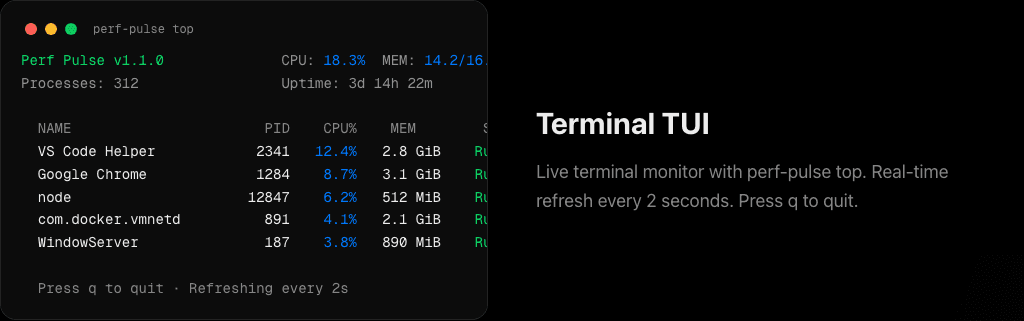
The same core signal earns a persistent terminal surface when the operator needs to watch change over time.
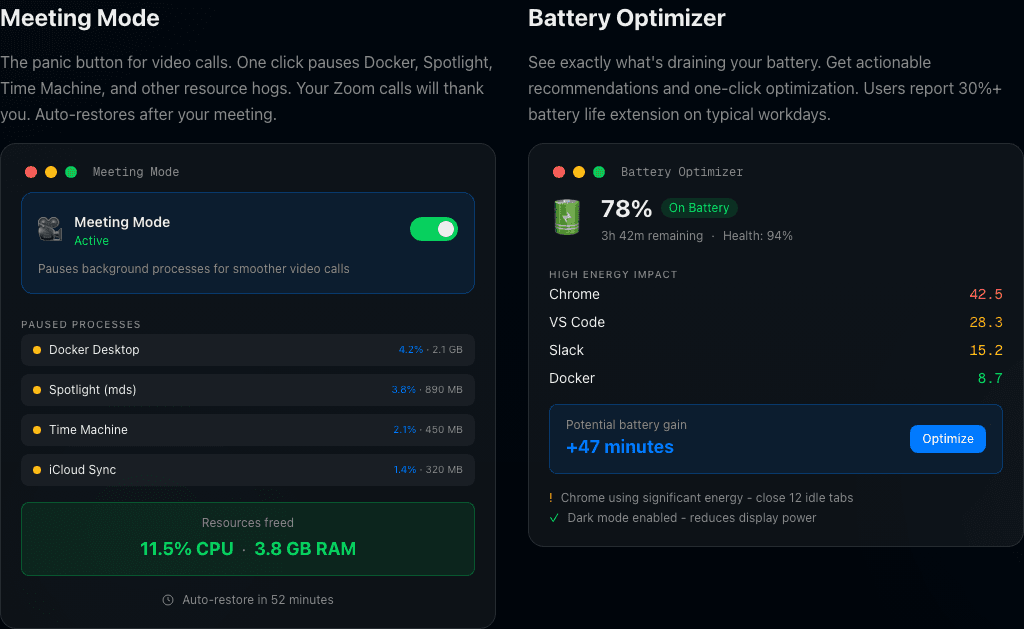
The interface makes the intervention, resources freed, paused processes, and restore path visible in one state.
What changed in my operating model
Crash Guard changed the product from something a developer remembers to open into protection that can notice first. The hard part was not adding another alert; it was joining early detection, useful context, configurable sensitivity, and carefully bounded intervention without overstating what a signal request can guarantee.